Chat Service - Basics
The chat service is responsible for all interactions with the Unique chat frontend as seen below

The following elements are directly influenced by it.
| Element | Description |
|---|---|
| User Message | The request as entered by the user |
| Assistant Message | The answer of the agent/workflow or LLM |
| Json Value | The final request sent to the LLM that creates the assistant message |
| Debug Info | Debug information generated during the processing of the request |
The ChatService from the unique_toolkit is used to communicate to these elments. Please see Event Driven Applications on how to initialize services and setup a development setup. The service itself can be imported as
from unique_toolkit import ChatService
Chat State
The ChatService is a stateful service and therefore should be freshly instantiated for each request sent by a user from the frontend.
Basics
The below sequence diagram shows the dataflow on user input.
sequenceDiagram
    participant FE as Frontend
    participant B as Backend
    participant W as LLM Workflow/Agent
    participant DB as Database

    FE->>B: Send user input

    B->>DB: Create User Message
    B->>DB: Create Assistant Message (placeholder)
    B-->>W: Emit `ChatEvent`

    W->>B: Update Assistant  Message
    B-->>FE: Return Assistant Message
    B->>DB: Update Assistant Message
The Chat Event
For each input of the user the application obtains a ChatEvent, this objects contains the id's of the user message in the database as well as the following assistant message entry. We can use these entries to return the final as well as intermediate results to the user using
chat_service.modify_assistant_message(
        content="Intermediate assistant message",
    )
The functionality automatically uses the last assistant message within the chat.
The message can be updated as many times as desired to display intermediate results but it is important to ensure that the user has time to read it between the updates. Especially, when using the async version modify_assistant_message_async a short async sleep after modification can be helpful.
chat_service.modify_assistant_message(
        content="Final assistant message",
    )
Modify assistant messages with LLM
The most used functionality is to create an assistant message via a stream to the frontend and to safe it in the database. Therefore, we use
chat_service.complete_with_references(
        messages = messages,
        model_name = LanguageModelName.AZURE_GPT_4o_2024_1120)
and again the functionality automatically returns the the last assistant message in the chat.
Full Examples (Click to expand)
# %%
import time

from unique_toolkit import (
    ChatService,
    KnowledgeBaseService,
)
from unique_toolkit.app.dev_util import get_event_generator
from unique_toolkit.app.schemas import ChatEvent
from unique_toolkit.app.unique_settings import UniqueSettings

settings = UniqueSettings.from_env_auto_with_sdk_init()
for event in get_event_generator(unique_settings=settings, event_type=ChatEvent):
    # Initialize services from event
    chat_service = ChatService(event)
    kb_service = KnowledgeBaseService.from_event(event)
    chat_service.modify_assistant_message(
        content="Intermediate assistant message",
    )
    time.sleep(2)
    chat_service.modify_assistant_message(
        content="Final assistant message",
    )
# %%
import unique_sdk
from unique_toolkit import (
    ChatService,
    KnowledgeBaseService,
    LanguageModelName,
)
from unique_toolkit.app.dev_util import get_event_generator
from unique_toolkit.app.schemas import ChatEvent
from unique_toolkit.app.unique_settings import UniqueSettings
from unique_toolkit.framework_utilities.openai.message_builder import (
    OpenAIMessageBuilder,
)

settings = UniqueSettings.from_env_auto_with_sdk_init()
for event in get_event_generator(unique_settings=settings, event_type=ChatEvent):
    # Initialize services from event
    chat_service = ChatService(event)
    kb_service = KnowledgeBaseService.from_event(event)
    messages = (
        OpenAIMessageBuilder()
        .system_message_append(content="You are a helpful assistant")
        .user_message_append(content=event.payload.user_message.text)
        .messages
    )
    chat_service.complete_with_references(
        messages=messages, model_name=LanguageModelName.AZURE_GPT_4o_2024_1120
    )
Unblocking the next user input
For each user interaction the plattform is expected to answer in some form. Thus, the user input is blocked during the process leading to this answer as seen below.

It can be unblocked using
chat_service.free_user_input()
which should be called at the end of an agent interaction. Alternatively the user input can be freed by setting the set_completed_at flag in create_assistant_message or modify_assistant_message.
Full Examples
Full Examples (Click to expand)
# %%
import time

from unique_toolkit import (
    ChatService,
    KnowledgeBaseService,
)
from unique_toolkit.app.dev_util import get_event_generator
from unique_toolkit.app.schemas import ChatEvent
from unique_toolkit.app.unique_settings import UniqueSettings

settings = UniqueSettings.from_env_auto_with_sdk_init()
for event in get_event_generator(unique_settings=settings, event_type=ChatEvent):
    # Initialize services from event
    chat_service = ChatService(event)
    kb_service = KnowledgeBaseService.from_event(event)
    chat_service.modify_assistant_message(
        content="Intermediate assistant message",
    )
    time.sleep(2)
    chat_service.modify_assistant_message(
        content="Final assistant message",
    )
# %%
from unique_toolkit import (
    ChatService,
    KnowledgeBaseService,
)
from unique_toolkit.app.dev_util import get_event_generator
from unique_toolkit.app.schemas import ChatEvent
from unique_toolkit.app.unique_settings import UniqueSettings

settings = UniqueSettings.from_env_auto_with_sdk_init()
for event in get_event_generator(unique_settings=settings, event_type=ChatEvent):
    # Initialize services from event
    chat_service = ChatService(event)
    kb_service = KnowledgeBaseService.from_event(event)
    chat_service.modify_assistant_message(
        content="Final assistant message",
    )
    chat_service.free_user_input()
Adding References
For applications using additional information retrieved from the knowledge base or external Apis references are an important measure to verify the generated text from the LLM. Additionally, references can also be used on deterministically created assitant message as in the following example
Manual References
chat_service.modify_assistant_message(
        content="Hello from Unique <sup>0</sup>",
        references=[ContentReference(source="source0",
                                     url="https://www.unique.ai",
                                     name="reference_name",
                                     sequence_number=0,
                                     source_id="source_id_0",
                                     id="id_0")]
    )
In the content string the refercnes must be referred to by <sup>sequence_number</sub>. The name property of the ContentReference will be displayed on the reference component and below the message as seen below

Referencing Content Chunks when streaming to the frontend
Lets assume that the vector search has retrieved the following chunks
chunks = [ContentChunk(text="Unique is a company that provides the platform for AI-powered solutions.",
                        order=0,
                        chunk_id="chunk_id_0",
                        key="key_0",
                        title="title_0",
                        start_page=1,
                        end_page=1,
                        url="https://www.unique.ai",
                        id="id_0"),
          ContentChunk(text="Unique is your Responsible AI Partner, with extensive experience in implementing AI solutions for enterprise clients in financial services.",
                       order=1,
                       chunk_id="chunk_id_1",
                       key="key_1",
                       title="title_1",
                       start_page=1,
                       end_page=1,
                       url="https://www.unique.ai",
                       id="id_1")
          ]
If we want the LLM be able to reference them in its answer we need to present the information nicely, e.g. in a markdown table
def to_source_table(chunks: list[ContentChunk]) -> str:
    header = "| Source Tag | Title |  URL | Text \n" + "| --- | --- | --- | --- |\n"
    rows = [f"| [source{index}] | {chunk.title} | {chunk.url} | {chunk.text} \n" for index,chunk in enumerate(chunks)]
    return header + "\n".join(rows)
The index of the list here is important as the backend requires to match the output of the LLM to the content chunk, for this we use the following reference guidelines as part of the system prompt.
reference_guidelines = """
Whenever you use information retrieved with a tool, you must adhere to strict reference guidelines.
You must strictly reference each fact used with the `source_number` of the corresponding passage, in
the following format: '[source<order_number>]'.

Example:
- The stock price of Apple Inc. is $150 [source0] and the company's revenue increased by 10% [source1].
- Moreover, the company's market capitalization is $2 trillion [source2][source3].
- Our internal documents tell us to invest[source4] (Internal)
"""
The message to the LLM could now look like this
messages = (
        OpenAIMessageBuilder()
        .system_message_append(content=f"You are a helpful assistant. {reference_guidelines}")
        .user_message_append(content=f"<Sources> {to_source_table(chunks)}</Srouces>\n\n User question: {event.payload.user_message.text}")
        .messages
    )

chat_service.complete_with_references(
        messages=messages,
        model_name=LanguageModelName.AZURE_GPT_4o_2024_1120,
        content_chunks=chunks)

Full Examples (Click to expand)
# %%
from unique_toolkit import (
    ChatService,
)
from unique_toolkit.app.dev_util import get_event_generator
from unique_toolkit.app.schemas import ChatEvent
from unique_toolkit.app.unique_settings import UniqueSettings
from unique_toolkit.content.schemas import (
    ContentReference,
)

settings = UniqueSettings.from_env_auto_with_sdk_init()
for event in get_event_generator(unique_settings=settings, event_type=ChatEvent):
    chat_service = ChatService(event)
    chat_service.modify_assistant_message(
        content="Hello from Unique <sup>0</sup>",
        references=[
            ContentReference(
                source="source0",
                url="https://www.unique.ai",
                name="reference_name",
                sequence_number=0,
                source_id="source_id_0",
                id="id_0",
            )
        ],
    )
# %%
from unique_toolkit import (
    ChatService,
    LanguageModelName,
)
from unique_toolkit.app.dev_util import get_event_generator
from unique_toolkit.app.schemas import ChatEvent
from unique_toolkit.app.unique_settings import UniqueSettings
from unique_toolkit.content.schemas import (
    ContentChunk,
)
from unique_toolkit.framework_utilities.openai.message_builder import (
    OpenAIMessageBuilder,
)

settings = UniqueSettings.from_env_auto_with_sdk_init()
for event in get_event_generator(unique_settings=settings, event_type=ChatEvent):
    chat_service = ChatService(event)
    chunks = [
        ContentChunk(
            text="Unique is a company that provides the platform for AI-powered solutions.",
            order=0,
            chunk_id="chunk_id_0",
            key="key_0",
            title="title_0",
            start_page=1,
            end_page=1,
            url="https://www.unique.ai",
            id="id_0",
        ),
        ContentChunk(
            text="Unique is your Responsible AI Partner, with extensive experience in implementing AI solutions for enterprise clients in financial services.",
            order=1,
            chunk_id="chunk_id_1",
            key="key_1",
            title="title_1",
            start_page=1,
            end_page=1,
            url="https://www.unique.ai",
            id="id_1",
        ),
    ]

    def to_source_table(chunks: list[ContentChunk]) -> str:
        header = "| Source Tag | Title |  URL | Text \n" + "| --- | --- | --- | --- |\n"
        rows = [
            f"| [source{index}] | {chunk.title} | {chunk.url} | {chunk.text} \n"
            for index, chunk in enumerate(chunks)
        ]
        return header + "\n".join(rows)

    reference_guidelines = """
    Whenever you use information retrieved with a tool, you must adhere to strict reference guidelines.
    You must strictly reference each fact used with the `source_number` of the corresponding passage, in
    the following format: '[source<order_number>]'.

    Example:
    - The stock price of Apple Inc. is $150 [source0] and the company's revenue increased by 10% [source1].
    - Moreover, the company's market capitalization is $2 trillion [source2][source3].
    - Our internal documents tell us to invest[source4] (Internal)
    """
    messages = (
        OpenAIMessageBuilder()
        .system_message_append(
            content=f"You are a helpful assistant. {reference_guidelines}"
        )
        .user_message_append(
            content=f"<Sources> {to_source_table(chunks)}</Srouces>\n\n User question: {event.payload.user_message.text}"
        )
        .messages
    )

    chat_service.complete_with_references(
        messages=messages,
        model_name=LanguageModelName.AZURE_GPT_4o_2024_1120,
        content_chunks=chunks,
    )
Post Answer
Debug Information
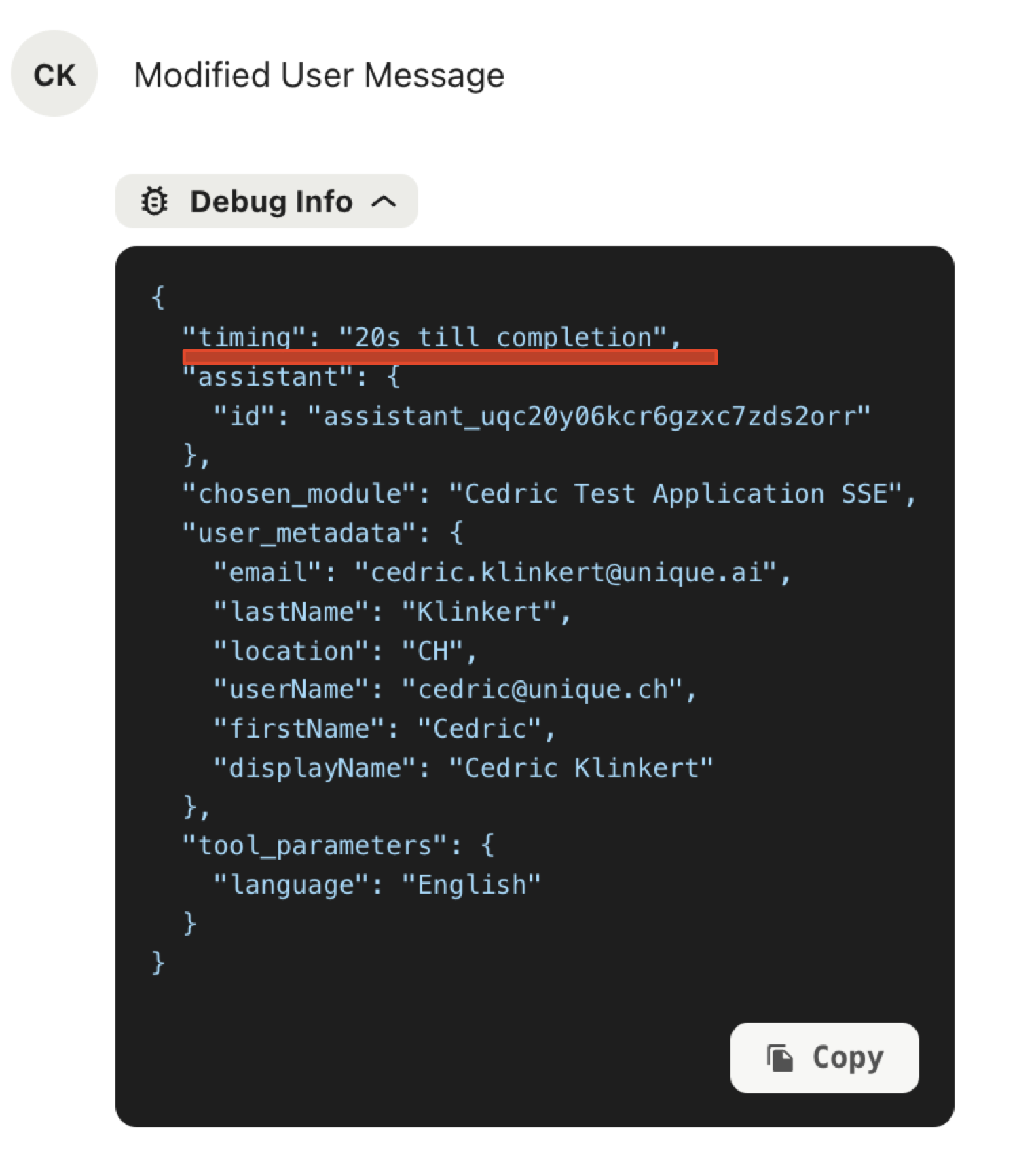
Debuging information can be added to both the user and assistant messages but only the debug information that is added to the user message will be shown in the chat frontend.
Therefore we recommend to use
debug_info = event.get_initial_debug_info()
debug_info.update({"timing": "20s till completion"})


chat_service.modify_user_message(
        content="Modified User Message",
        message_id=event.payload.user_message.id,
        debug_info=debug_info
    )
The debug information will be updated after a refresh of the page and look as follows
Full Examples (Click to expand)
# %%
from unique_toolkit import (
    ChatService,
    KnowledgeBaseService,
)
from unique_toolkit.app.dev_util import get_event_generator
from unique_toolkit.app.schemas import ChatEvent
from unique_toolkit.app.unique_settings import UniqueSettings

settings = UniqueSettings.from_env_auto_with_sdk_init()
for event in get_event_generator(unique_settings=settings, event_type=ChatEvent):
    # Initialize services from event
    chat_service = ChatService(event)
    kb_service = KnowledgeBaseService.from_event(event)
    chat_service.modify_assistant_message(
        content="Final assistant message",
    )
    chat_service.free_user_input()
# %%
from unique_toolkit import (
    ChatService,
    KnowledgeBaseService,
)
from unique_toolkit.app.dev_util import get_event_generator
from unique_toolkit.app.schemas import ChatEvent
from unique_toolkit.app.unique_settings import UniqueSettings

settings = UniqueSettings.from_env_auto_with_sdk_init()
for event in get_event_generator(unique_settings=settings, event_type=ChatEvent):
    # Initialize services from event
    chat_service = ChatService(event)
    kb_service = KnowledgeBaseService.from_event(event)
    chat_service.modify_assistant_message(
        content="Final assistant message",
    )

    debug_info = event.get_initial_debug_info()
    debug_info.update({"timing": "20s till completion"})

    chat_service.modify_user_message(
        content="Modified User Message",
        message_id=event.payload.user_message.id,
        debug_info=debug_info,
    )
    chat_service.free_user_input()
Message Assessments
Once an assistant has answered its time to access the quality of its answer. This happense usually through an LLM call to a more sophisticated or a task specialized LLM. The result of the assessment can be reported using the message assessments by the Unique plattform.
if not event.payload.assistant_message.id:
    raise ValueError("Assistant message ID is not set")

message_assessment = chat_service.create_message_assessment(
        assistant_message_id=event.payload.assistant_message.id,
        status=ChatMessageAssessmentStatus.PENDING,
        type=ChatMessageAssessmentType.COMPLIANCE,
        title="Following Guidelines",
        explanation="",
        is_visible=True,
    )
During the assessment a pending indication can be shown as below.

Once the assessment is finished it can be reported using
chat_service.modify_message_assessment(
    assistant_message_id=event.payload.assistant_message.id,
    status=ChatMessageAssessmentStatus.DONE,
    type=ChatMessageAssessmentType.COMPLIANCE,
    title="Following Guidelines",
    explanation="The agents choice of words is according to our guidelines.",
    label=ChatMessageAssessmentLabel.GREEN,
)
which displays as

Full Examples
Full Examples (Click to expand)
# %%
from unique_toolkit import (
    ChatService,
    KnowledgeBaseService,
)
from unique_toolkit.app.dev_util import get_event_generator
from unique_toolkit.app.schemas import ChatEvent
from unique_toolkit.app.unique_settings import UniqueSettings

settings = UniqueSettings.from_env_auto_with_sdk_init()
for event in get_event_generator(unique_settings=settings, event_type=ChatEvent):
    # Initialize services from event
    chat_service = ChatService(event)
    kb_service = KnowledgeBaseService.from_event(event)
    chat_service.modify_assistant_message(
        content="Final assistant message",
    )

    debug_info = event.get_initial_debug_info()
    debug_info.update({"timing": "20s till completion"})

    chat_service.modify_user_message(
        content="Modified User Message",
        message_id=event.payload.user_message.id,
        debug_info=debug_info,
    )
    chat_service.free_user_input()
# %%
from unique_toolkit import (
    ChatService,
    KnowledgeBaseService,
)
from unique_toolkit.app.dev_util import get_event_generator
from unique_toolkit.app.schemas import ChatEvent
from unique_toolkit.app.unique_settings import UniqueSettings
from unique_toolkit.chat.schemas import (
    ChatMessageAssessmentLabel,
    ChatMessageAssessmentStatus,
    ChatMessageAssessmentType,
)

settings = UniqueSettings.from_env_auto_with_sdk_init()
for event in get_event_generator(unique_settings=settings, event_type=ChatEvent):
    # Initialize services from event
    chat_service = ChatService(event)
    kb_service = KnowledgeBaseService.from_event(event)
    chat_service.modify_assistant_message(
        content="Final assistant message",
    )
    if not event.payload.assistant_message.id:
        raise ValueError("Assistant message ID is not set")

    message_assessment = chat_service.create_message_assessment(
        assistant_message_id=event.payload.assistant_message.id,
        status=ChatMessageAssessmentStatus.PENDING,
        type=ChatMessageAssessmentType.COMPLIANCE,
        title="Following Guidelines",
        explanation="",
        is_visible=True,
    )
    chat_service.modify_message_assessment(
        assistant_message_id=event.payload.assistant_message.id,
        status=ChatMessageAssessmentStatus.DONE,
        type=ChatMessageAssessmentType.COMPLIANCE,
        title="Following Guidelines",
        explanation="The agents choice of words is according to our guidelines.",
        label=ChatMessageAssessmentLabel.GREEN,
    )